

QR Payments
- QR Terminal — standalone application for QR payment processing
- QR Payment Integration — description of the optimal and simple integration
For general information about QR payments, visit our blog.
Supported Hardware and Requirements
Authentication credentials assigned by the Financial Administration to individual cash registers will be used to verify payments.
FT5000
| Requirement | Value |
|---|---|
| Firmware | 5.2.x or higher |
| Hardware | VAROS CHDU5001 |
| Configuration | Configured IBAN, notification account owner, fixed format enabled |
| Print Manager | TM5000 v2.6.x or higher |
FT4000
| Requirement | Value |
|---|---|
| Print Manager | TM5000WIN v3.3.x or higher |
| Hardware | VAROS CHDU5001 |
| Configuration | Configured IBAN, notification account owner |
Configuration
In the “QR Code Payment” tab, configure:
- Seller’s account number — standard business account with payment notifications enabled
- QR code display method — customer display or print on eKasa
- Receipt printing — confirmation of QR payment completion
- Tender (P3–P8) — tender for recording QR payments in the POS application
Customer Display
Connection via USB port (also serves as power supply) — FT5000 via printer USB port, FT4000 via free USB port on PC.
More information about the display
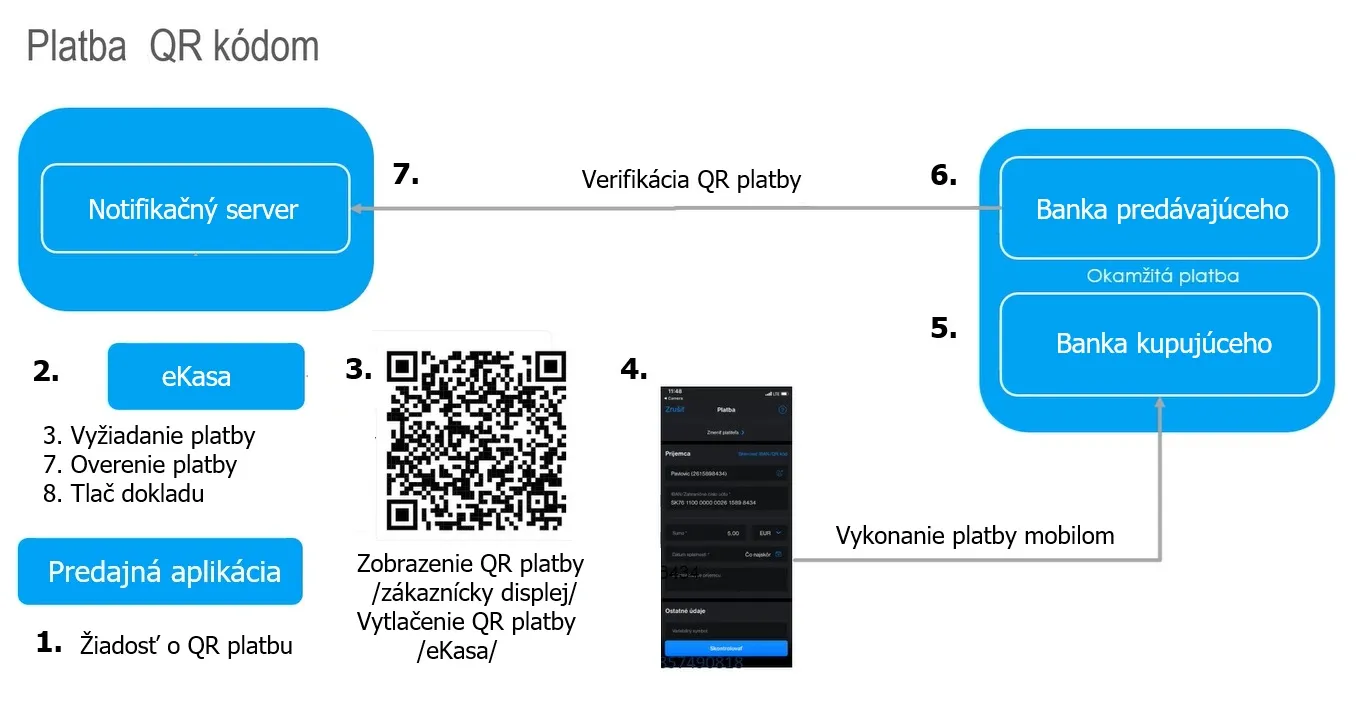
Technical Transaction Flow
- POS application → requests QR payment from eKasa
- eKasa → contacts the FS notification server, obtains a unique payment identifier
- QR code → generated based on the identifier, displayed/printed
- Buyer → scans the QR code with their phone → bank automatically fills in payment details
- Buyer’s bank → executes immediate payment to the seller’s account
- Seller’s bank → sends confirmation to the notification server
- eKasa → verifies payment via the notification server → prints receipt or rejection notice
For optimal integration
- eKasa → verifies payment via the notification server → prints only payment receipt or rejection notice
- once the POS application verifies the payment, it sends the cash register receipt to eKasa for printing
For simple integration
- eKasa → verifies payment via the notification server → prints cash register receipt or rejection notice
Related
- FT4000 Print Manager — print manager with QR payment support